Monkey Boy Animations Blog

RSS
  • Blog
  • About Me
  • Contact Info
  • Portfolio
  • Final Year Project
  • Showreel


July 2011 Showreel


  Week 2 Over In A Flash...

Jan 24, 2012 by sd | 2 comments | Tweet Post | Share Post | Email Post
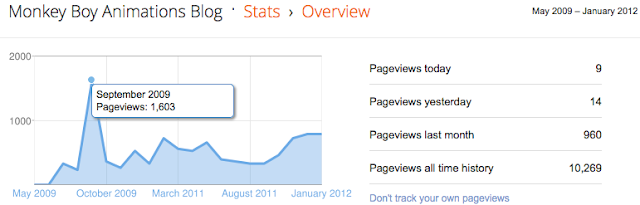
So let me start by saying sorry if the new linking system coursed you any inconvenience, from now on i'll be using the adf.ly short url site as for roughly every 1,000 clicks i get on my links i receive $1, although i dont see myself making much from this as my highest blog view was back in September 2009 when i had 1,600 views i still feel it was worth trying out.


For the people that came here from other means and dont know what im talking about.....when you click a adf.ly link to my blog it will take you to an advert page with a 5 second countdown on the top right corner of the screen, once that reaches 0 it will say "skip ad", just click on that and it will bring you here.....if this gets annoying for people please just leave a comment in any of my posts and if enough people find it a hassle i will set it back to normal.

Thank you for your time......

Now on to the animations, so i just finished week 2 of my new schedule and i must say its going rather well, i had a few issues the other day and for the last 2 days i've been feeling really ill (hence why its taken me 2 days to post) but other then that its all goes great.

I started off this week with a good old bouncing ball excessive as part of the Guardian course and as part of the Slow In & Slow Out class, the task was the have the ball go through 4 different stages starting with a linear up and down motion and ending with a slow in and slow out motion on both the up and down.


Link To Video


I started by placing keys at frame 0, 15 and 30 then using the inbetweens that the computer had already put in there i set a key at frame 13 and moved it back to frame 9, this gave me a slow in on the up of the bounce and i repeated this process for the slow out. this offered a smooth movement and it utilized the computers spacing to get the result i was looking for.

I use this same technique for the slow in and out for the down as well and the combined the 2 to get the final result of slow in and out on both the up and down.

Class 8 was focused on Arcs and how they are present in every organic movement we do so should be studied in great detail.
The Task was the have the ball bounce across the screen in a zigzag and then add breakdowns either side of the first up to create an arc in the movement instead of having it look jagged and sharp.


Link To Video


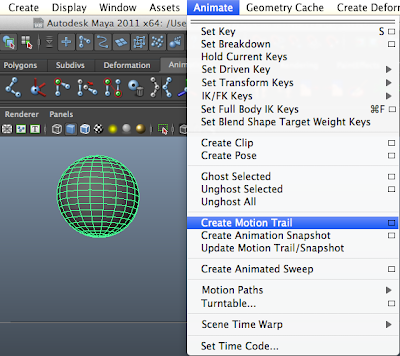
During this class i found a really useful tool in Maya that i hadn't known about previously which was the Motion Trail option in the Animate menu.

This tool will plot out the motion of the object that it is linked with, to use it this is what you need to do.

Select the object you which to see the tangency of and in the Animate menu click on Create Motion Trail, if you want to get more options click on the small box next to it and the options window will open.

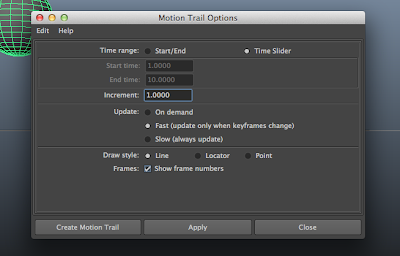
In the options menu you can choose the time rage, the increments of where you want to points to be placed (every 2 frames, every 6 frames, etc) and how it is updated....if you are fine tuning your arcs i would suggest having it on Fast (Update only when keyframes change), there is also the option as to how you would like the points to be displayed, you can choose from a Line which will create a lone between every point and how you exactly where the object will be, Locator which basically shows Nulls where points are and Points which does basically the same thing as Locator but less messy.

there is a final option that called Frames which is the frame number, i have this turned on as you can then see what frame number everything is happening without having to look through the timeline.

Once you have selected all the options you want you will have something that looks like this....
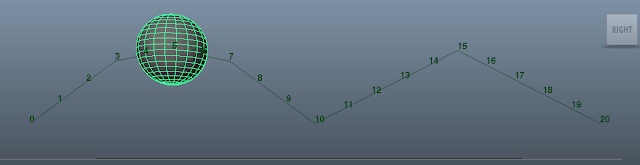

If once the points are plotted you dont like the way it looks, it can be changed very easily in the Outliner....just go into the Outliner and select motionTrailHandle and then in the Channel Box on the right hand side of the screen there will be the option to change some of the setting you had already picked such as the Draw Style (Line, Locator, Point) and if the frame numbers should be displayed.
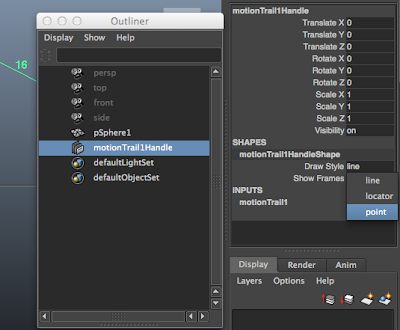

the great thing about this this option in Maya is that its constantly updating (depending on which option you picked in the options menu) so when you move the object it will correct the line to match the changes made.
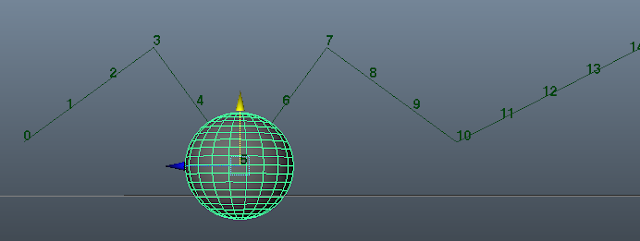

I hope that helps others when they are looking for a way of fine tuning there animations....

So the last practical class of the week was secondary action, now this lesson was a little confusing to me and im not sure if i fully understood it but i followed the notes as best as i could and i hope that it goes into more detail on the subject in later lessons so i can get a better grasp on it.

The task was to create a bouncing ball (similar to the one in the last lesson) but this time having it follow a sinewave on the upwards motion and give it a slight looping action on the down, as i say i wasn't to sure what this meant....i looked at what i did back in 2009 and reading it again its totally different to what i did back then (meaning is did it really wrong last time round), but heres what i finally ended up with.


Link To Video


So thats it for this week really in the way of practicals.....the other lessons where more of study reference videos and images, a fun class was Timing....i had to time a load of different movements and work out how many frames it would take to do each movement.

As an example, for me to walk from one side of the room to the other it takes me 4 seconds at a normal pace and i use a total of 8 steps which means that the scene would be 96 frames long (at 24 frames a second) and each step would take 12 frames meaning each step would be half a second. this was a really fun excessive and for th rest of the day i was timing every little action i did to fine out how long things would take, its something will be doing a lot more as well until i feel i have a better grasp of timing as i know in the past my timing on my animations haven't been the best but hopefully which these exercises that will improve.

So all in all its been a pretty good week, sadly though my script still hasn't been given me any tasks i think it was a little to high of a random number range so i have taken the max down to 3 so now if its 1 it will give me a drawing task, if its 2 it will give me an animation task and if its 3 it will give me nothing....hopefully this will work better. if nothing comes up by Thursday though i think im going to just set it to max 2 and have it run every 3 days so that i will defiantly get a task every 3 days.

Anyone else who is using my script.....are you finding that its not coming up with a task for you at all or is it working well for you? did you change the number range on the script to get better result, if you did what numbers are you using? i would love to know.

Now in my travels around YouTUBE again i came across the Lynda.com tutorials for Character Animation on there podcast channel, they are just taster videos of the course that they offer (Character Animation Fundamentals with Maya), since the videos where a little scattered around the site i took all the ones that where available on there channel and made a playlist out of them for your guys to watch so i hope you enjoy.


Link To PlayList

Well thats it for this week guys, talk to you all in a weeks time and dont forget to comment about the advert links if you find them troublesome at all.


Thank you.

Animation Salvation, News


Top Of Page


  Missing Uploads and Updated Script..

Jan 17, 2012 by sd | 0 comments | Tweet Post | Share Post | Email Post
So i've finally managed to get the videos that wouldn't upload from my last blog post to upload to YouTUBE, its seems that it was having some problem with the codac i was using (which is odd cos the one that did work & my vlog both used the same one..hmmm).

The first video is from class 4 and covered Straight Ahead Action & Pose-to-Pose action....for straight ahead the task was the have a ball going around the boxes with a keyframe at every 5th frame, this was a really fluid motion between the boxes but there was no structure an the spead of the ball was hard to control.

For pose-to-pose the task was to have a key every time the ball was between the boxes, then to go back and add the breakdowns, this offered a lot more control but there was no fluidity in the motion.

The third one wasn't ask for but i thought i would try and incorporate the 2 different styles to produce a more fluid motion but with a structure to it.


Video Link

The next practical class was class 5 covered Follow Through and Overlapping Action, the task was to animate a 3 bone FK chain across a sinewave, although the bone chain i used was IK it gave the same result....the reason for using IK over FK was because i wasn't sure on how to create a FK chain in Maya as i've not done any rigging in this package before, but i may return to this task again when i figure FK out :)

The animation has keys on each and every frame from 1 - 60 with exception of the first root of the bone chain which only has keys on 1, 5, 10, 15, 20, 25, 30, 35, 40, 45, 50, 55, 60.


Video Link


Now as for the code......during last week when i was using the code i would get an error message after 2 minutes if the button wasn't pressed....this error message would be to say that AppleScript has timed out and the script would no longer work until it ran again.
to fix this small bug i've increased the time span on both of the scripts to 10 hours, this means that if the script where to go off but you where away from your computer for a couple of hours (or 10) then the script would still work when you got back to press the button to accept the task or not.

If you are already using my script then please head over to the page and copy the new one making changes where needed just like before....alternatively if you wish to just add the changes yourself then its quite simple.

For the RandomImage.app script before the first line of the script add..

with timeout of 36000 seconds

The number can be changed to anything you like just know that it works in seconds, so 36000 seconds is 10 hours....to work it out yourself for your own time scale the math is easy 60*60*X=(number of seconds) (x is hours wanted)

Then in that same script on the very bottom line after everything else add...

end timeout

Now just save changes and that one script done.

The next one (the Task script) is a little harder....same principle of just adding those 2 lines of code but they have to be in the right place. So first add the following line just under the second result line.

with timeout of 36000 seconds

so if you have kept the script the same as my example script in the original blog post it would look like this....

else
if result is 8 then
with timeout of 36000 seconds
tell application "Finder"
activate

Once you have done that scroll down to the bottom of the script and add the following just above the second end if...

end timeout

So the last 3 times of the code should be like this....

end timeout
end if
end if

If you've done everything write (and if i've explained it well enough) then the script should perfectly and you should also now have a 10 hour gap between it activating and it timing out.

If you have any questions about this or anything else please feel free to comment below and i will get back to you asap :)

Animation Salvation, News


Top Of Page


  First Week Of A New Scheduled

Jan 15, 2012 by sd | 3 comments | Tweet Post | Share Post | Email Post
I know i said that i would be posting every day or every other day but there hasn't really been much to upload as most of the classes have been reference video study classes or non animation practicals like studying my own body mechanics.....in total there has only been 3 animation practicals i couldn't upload and 2 of them wont upload to YouTUBE for some reason (im working on fixing it as im writing this).

So as for my script i wrote, its working but the variable has been 2 high.....when i tested it using iCal to run the script every 5 minutes for 1 hour i was given a task 70% of the time which was perfect but in practical over the week it has only generated one task and which was a drawing task......so yesterday i changed the random number selection to pic from 1-5 this way i have a 2 in 5 change of getting a task so over the next week it will work a lot better (hopefully), if nothing comes up by Tuesday I will set it lower and if then nothing comes up by Friday i will either activate it myself each day or look into why its not working. (could have something to do with iCal but im not sure, but the script is perfect in regards to its construction and it works like a charm in test).

Anyway....back to the classes, so as i said most of the classes have been focused on looking at reference footage and studying the movements of brake-dancing to understand better squash and stretch, this was a great class as for a long time i always associated squash and stretch with the deformation of mass to give an unusual and impossible form, but this study showed me that we squash and stretch in all aspects of our movement. One of the physical exercises i did was to hop forward on 1 leg, this was to show that when the leg bends that is a squash position and when it straightens out to propel me forward that was the stretch position....then i was asked to try and hop forward without the bending of my leg (the squash) and it was virtually impossible, it was at this point i realized that there is squash and stretch in all aspects of animation and i'll be remembering this and looking for it a lot more when doing my own animations.

Next class focused on Anticipation and how it's a fundamental of movement which is why its a principle of animation, this class one a practical one and i had to animate a ball going across the screen over 5 frames, i attempted this several times but with it only being 5 frames it was moving to fast to make anything out so i changed it to 12 frames so that it registered on screen and i could focus on what was happening.


Link To Video Page

This is one of the only videos that would upload to YouTUBE but as soon as i work out whats different between this one and the others i'll be sure to either update this post with the new videos or create a new post with them one.

The great thing about these classes is that it gives you real work examples to help bring across the principle, like with anticipation the example was given of punching someone in the face (a violent example granted but one that helped explain it very well), if i was to just straighten my arm out it wouldn't course much damage but if i was to move the fist in the opposing direction first then it would have a lot more force behind it. So with an anticipation it gives the movement a lot more power then without.

Although these things i have studied many times before, since i neglect to go over them time and time again i tend to forget them but with this new class scheduled im really getting back on my feet.

Classes this week covered the importance of staging and how the classic comedic movie stars such as Charlie Chaplin and Laurel and Hardy would stage things in such a way that it was noticeable and registered by the audience without it needing shoved in your face, this is something that lends its self to staging in animation and studying these greats i have got a better understanding of what it takes to create stronger staging.

The rest of the classes required practical work (which are the ones i haven't been able to upload), such as Straight Ahead & Pose-To-Pose and Follow Trough & Overlapping Action.....in these classes i was asked to move a ball around 4 boxes in a straight ahead fashion and then do the same again using pose to pose, each of these has there advantages and disadvantages but for me i have been using a combination of the 2 for a few years now and its the way i like to work but to go back to one or the other for this task was a fun exercise that took me back to the basics and really helped. As for follow through and overlapping action i was told to create a 3 bone chain and animate the movement of it along the image of a sinewave (imaged below) as this was a great start to understanding overlapping action, this is something that will be gone over in a lot more detail in future classes.
Next week i believe i go into the principles of bouncing balls but i've not looked at the class layout so i can't be sure until the day. but thats all the classes for this week.

like i said, i will be changing the script i wrote and to see if i can make it happen more often then 1 time in a week and i'll upload the videos to the blog once i've got them working on YouTUBE.

As kind of a Animation Spotlight thing i would like to mention some really great tutorials online for you to use and check out, i found these on YouTUBE during my daily hunt and thought you might like to check them out as well.

firstly we have an animation student at Animation Mentor called Matthew Hamilton who is doing a Tips and Tricks class in Maya, every few days (sometimes a little longer) he's uploading a tutorial video going over useful tips and tricks that you can use in Maya such as the Animation Reference System which i was unaware of until recently, he takes you step by step through it all and makes it very easy to follow.

His Art Blog: http://hammunition.blogspot.com/
His YouTUBE Channel: http://www.youtube.com/user/mattJhamo/featured

and here is a video just to show you what i mean....


The other YouTUBER i wanted to mention is LearnMaya1 who does really nice tutorials on character animation going through blocking poses out from start to finish and in the future they will be moving onto other passes of animation.

LearnMaya1 Website: http://www.3daide.com/
LearnMaya1 YouTUBE: http://www.youtube.com/user/Learnmaya1/featured

Finally a video i came across of industry animators Ronnie Williford and Frank Gabriel teaching Timing for Animation and Animating Dialog, these videos are part of the PowerHouseAnim Channel which has a load of other really great lessons on there that i strongly suggest checking out.

Ronnie Williford - Timing for Animation: http://youtu.be/HqGh3hRHExs
Frank Gabriel - Animating Dialog: http://youtu.be/tINoTLKoxTk

1 Last thing before i go, for those looking to do life drawing but classes aren't in your local area or they are but just cost to much, there is a free 24 hour trail at this great site that offers videos of models in different poses but the best thing is that the videos revolve around the model 360o degrees so you can pause and draw then play find another position you like and then pause and draw again. the free trial offers 2 different models to draw from a female model called Charlotte and a male model called Costa, they pull some really great poses and offer you a lot to draw from.

all you need to do for the trial is enter your email address and your done...after you will have 24 hours members access to the site, and if you feel that its worth it (which it is in my opinion) you can subscribe for as little as $6.

Check it out: http://lifedrawingposes.com/free-trial/ (there is a sample video on the site so you can see what you get)

and if you still want more then i would suggest checking out this video by Sycra who goes over some life drawing in Photoshop just showing you there process, check out there main channel as well as there are a load of great videos to study from.


Sycra Life Drawing Video: http://youtu.be/XrHsumJ2HBg
Sycra Channel: http://www.youtube.com/user/Sycra

Anyway, thats it guys and gals....i hope you all have a great week and i'll talk to you again soon :) 

Animation Salvation, News


Top Of Page


  Reply To A Comment, And A Code...

Jan 8, 2012 by sd | 0 comments | Tweet Post | Share Post | Email Post
(this is going to be a long post but stick with it.....if you want to skip it though, i have an AppleScript for animators that you might find interesting if you are a Mac user near the bottom, click here to take you to it.)

So, about 4 or 5 days ago i was checking my old email account (as some of you know i migrated all my accounts into one as i was sick of having several email accounts) when i came across a notification email from this blog saying that on the 26th December i had received a comment.....when i had moved all my accounts over to the new email it would seem that i neglected to change the notification email so i didn't receive it when it was sent.

Anyway this is now fixed so i will now receive any comments made on all my sites......so back to the comment, at first i was delighted to get a comment as i rarely do and its something i ask for a lot in my posts so as you can imagine i was rather happy, that was until i started reading it.

You see the comment was from an animation teacher (they didn't leave there name, they just signed it "An animation teacher") and this teacher had some questions for me about how i see animation and if i was being realistic thinking i could continue on this road when i find it hard to grasp animation even with me having a degree in it.....and this did hit me rather hard and it made me think about my life and where it was heading with animation, made me question if this career was the right one for me and if i should just move onto something else. But then i remember what i use to be like back in high school and how much love i had for animating and how i was in college when i would sit in my classes from the time it opened to the time it closed practicing and reading up on techniques to improve myself....staying there until the security would ask me to leave the building for the 3rd time. I ask myself where did that part of me go, it seemed as soon as i hit university the passion i had just went away, sure i would animate and do the assignments given to me but it no longer burned inside of me like it once did......the only times throughout my university life i had that fire in my was around the time of Animex when i would see the masters at work and run home to animate walks and runs.

After i had finished reading the comment thought and spent the night tossing and turning thinking about everything this person had said and taking it in a massively negative way i finally got the to point where i thought why can't i be like i use to be, whats stopping me from being the best i can be and getting that dream job i have wanted since i was 5 years old........nothing but myself and my motivation.

So i would just like to reply to this comment and follow up on all the points made to me and the questions ask.....

The Comment....
Hello, I've popped on here every now and again to see what you are doing and I sometimes use you as an example to students I teach animation to. However not in the best way so I thought it would be fair to send you a little message explaining what I think and I also have some questions.

Firstly, do you live with parents? How do you afford this lifestyle? Secondly what takes up most of your time as my students often ponder it, you don't mention a paid job so they think you animate once and a while and then watch a lot of videos and games on the Internet. You have Downloaded, shamelessly illegally a lot of tutorials, however don't seem to do any?

I would like to offer some advice if I might, you don't seem to be treating this like a full time job, I use you in class as you have an animation degree but very little animation, you follow animation mentor but don't seem to realise they spend 30+ hours a week animating in maya, you clearly do not. And they do this for 18 months solid.

A student suggested I messaged you as i constantly looking at your slow work pace but never telling you was unfair, another student suggested that I leave you a list of advice, otherwise this would be 'trolling'. So as you asked for advice then I will leave some.

1. Do you love animating or watching animation and the 'idea'of being an animator, if you find it so hard after doing a degree I may suggest a change of career? I like comfy chairs, I would hate making them..

2. How many hours a week do you spend animating? If the answer is honestly a lot, why don't we see more? I currently use you as an example of a lazy person who wants to be an animator without putting the hours in, I'd love to use your blog as something I could show my students how someone can be great at animation.

3. Go back to the basics, even just for a couple of months, timing especially, use more video reference to help you animate, some students are baffled by the graph editor, learn to master it, it's SO useful.

4. Get feedback ALL the time, don't animate without showing other animators, use forums like 11secondclub.

5. Act out your scene and record yourself before you touch maya, do a rough pencil test in flash before you start playing with models.

6. Watch more French animation like Gobelins and Supenfocom for inspiration.

7. I challenge you to prove me and my students wrong, that you're not a lazy aminator. Produce at least 3 seconds every week. An average animator in a studio in London would be doing 30 seconds a week. So after a year of work they would have several minutes worth.

8. Lastly, you have to treat this like a 9-5 if you're going to make it, you should not allow yourself breaks. Animators work at least 7 hours a day, 5 days a week. Do you? If not, you won't make it.

Please don't take this as an attack or anything like that, I simply wanted to say this to my students but can't all the time so I have used you as my example of someone who is deluded by thinking they can do a little and eventually make it, this Industry needs passion, commitment and sacrifice. The next time I show your blog I want it to use it to show how someone can learn the art.

I wish you all the best in your endeavours.
An animation teacher.


So you ask do i live with my parent and the answer is no, i moved out from my parent house after my first year of university as it made more sense to live closer to campus and now im finished university im living with a colleague from Uni and have been doing so for almost 2 years now, as for affording my lifestyle, im not sure where you are writing me from but in the UK there is something called Job Seekers which is a government run program to help people find work, while on this program you are entitled to an allowance to cover the costs of living and rent but it only just covers those things so doesn't leave much for anything else. On the 23rd February thought I will be returning to the hospital for further surgery on my legs and will be unable to work so i will be put onto Employment Support Allowance which is basically the same but your not expected to be looking for work as you are unable to.....so i hope that answers those questions.

As for what takes up my time, i must be honest and say looking for work, gaming, watching movies, socializing, watching tutorial videos on YouTUBE and Vimeo and also read a lot of Forums and when i have an idea for an animation; animating although these ideas are few and far apart.

I must say one thing though and that is you are right i have downloaded tutorial videos in the past most of which have been illegally obtained (although in a lot of cases those illegally obtained ones are from friends and staff members from university), but that was when i was in university and the resources at my university where very lacking and without those tutorials i would not have gotten through my course, thats not the say that the teaching wasn't wonderful but it was also lacking in a lot of places and it felt like only 3 of the many lectures teaching us actually cared about our education and wanted us to succeed in what we wanted to become.....sadly these lecturers where in high demand because of this so tutorials (no matter how they where obtained) where the only real options.

These days though all my tutorials are either payed for or are available for free online by the creators, i have downloaded every tutorial video on YouTUBE, Vimeo and ScreenCast that have been created by the account user, i have copied every article and forum post i can find on animations to word documents and put them on my harddrive, i have contacted animators and in some cases received tutorials off them that they might have made for a friend. Any of the tutorials i couldn't afford that i had from being a student i simply deleted as after my course was over i felt that i was in the real world now and i had to work for that content.

As for doing my own tutorials, your right i haven't and thats for the simple fact that i just dont feel that i could teach as well as some of the other animators out there on YouTUBE, Vimeo and ScreenCast (plus all the others), i dont feel i could add anymore then what they already are.....i have dont one tutorial on scene painting in PhotoShop and its had a few views but it was a simple tutorial that i hadn't seem on the net so i thought i would do it. But i guess i could do more tutorials and maybe make it a regular thing but as of right now with all the great stuff out there i just dont see a need for it, but that doesn't mean i dont give out advice and critiques on peoples work on forums like CGSociety and 11SecondClub i do this whenever i see an animator asking for help and i feel that i can give some useful advice. so please dont assume that i take without giving cos don't, i just give advice when i feel i can.

So on to the section about advice, now you're right i dont treat this like a full time job and i know that thats wrong and as i said somewhere above i use to treat this like it was my world until i hit university and it just became a chore that i had to do, the fun and excitement was gone and thats down to me......if things where feeling like it wasn't fun anymore i should have made it fun somehow but i didn't and over the past 5 years since then it just got worse and worse, but your comment helped me see that and i do thank you for that, and thats why im making a change but i'll get on to that in a bit. Now as far as Animation Mentor goes i know that they spend 30+ hours a week in Maya and trust me i did try that but i was trained in XSi and moving over to Maya was very difficult for me, i dont know why but i was like learning a whole new language...sure working on the Cerebus Movie helped work out some of the controls and talking to friends at last years Animex but there are soooooo many things in that package i just can't get my head around the the only way i have been able to do it so far is through watching those YouTUBE videos and seeing how others are doing it and reading forums and posting questions (sometime never receiving a response)....but i still try and use it and i still try and learn it but until i get a better grasp on it there is no way i could do 30+ hours of animation in it.....but as i say im working on that.

Now im going to break my answers down here into numbers to correspond to your questions.....

1. Do you love animating or watching animation and the 'idea'of being an animator, if you find it so hard after doing a degree I may suggest a change of career? I like comfy chairs, I would hate making them..

I do love animating and watching animations and also the idea of being an animators....these are not exclusive of each other and work well hand in hand. but i guess over the years the "passion" for animating has dwindled and i need to find it again, and i know that i will...sadly its taking this comment to push myself. I do still find it hard and thats through fault of my own and in a small case the teaching i've had but as i say its a small case....the majority of it is down to me, but this can and will change but thats not going to be a change of career because i know that with the right frame of mind an the right self motivation i can be so much more then what i am right now.

 2. How many hours a week do you spend animating? If the answer is honestly a lot, why don't we see more? I currently use you as an example of a lazy person who wants to be an animator without putting the hours in, I'd love to use your blog as something I could show my students how someone can be great at animation.

Honestly, not as much as i should or could.....until your comment i actually didn't think anything of it but im actually now ashamed of myself for how little i do.....dont get my wrong i do still watch tutorials and sketch but i hardly animate, the last major thing i animated was the Dragon in the Cerebus Movie and that was back in November, i have been playing around with a scene using a sound bite i heard in an animation mentor students video but haven't uploaded anything on that since before i started work on the Dragon as i just left that it wasn't worth showing.....this was the last thing i uploaded but not the last time i worked on it here. But nobody can change this lack of work other then me and that what im going to do.

3. Go back to the basics, even just for a couple of months, timing especially, use more video reference to help you animate, some students are baffled by the graph editor, learn to master it, it's SO useful.

Funny you should say go back to basics, as i said at the start i wasn't until about 4 days ago i think when i got your post but before then i had made it a new years resolution to animate more and draw more so i started work on organizing my Guardian Training Course lessons that i had done back in 2009 into Text documents and adding the classes to my iCal so that each day i would have a lesson that i needed to do, these classes basically went over the 12 principles of animation working from bouncing ball to character movement. i completed the course once but i think i stopped uploading videos and updating blogs about it around around class 10 or 11, but this time around i'm going to be posting maybe every day or at the end of the week.

These classes ran for 3 months so as you can see my calendar is quite full....


Along with the classes i've also wrote out a little bit of AppleScript that randomly selects a text document from folder of around 50 on random days, these document have tasks in them such as "animate: a dog in a back garden in a kennel in Autumn" or "Draw: the three blind mice mounting climbing"....these could pop up every day or for 2 days and then nothing for the rest of the week. with this way of working im pushed into getting them done asap so that i dont have 3 animations on the go at once. As well as that some days it might randomly give me a image from my folder of over 1000 life models, still life photos and landscapes and i have to draw that in any style i wish, these will pop up instead of the tasks so not to give to many out.

So hopefully this will get me back to the basics and move me forward.....and if it doesn't, i'll just have to work even harder :)

(the script will be near to the bottom of this post)

4. Get feedback ALL the time, don't animate without showing other animators, use forums like 11secondclub.

I use to do this all the time, i use to submit my work to a load of different animation sites and send off my work to people i know in the industry to ask there opinion on work but i stopped doing, and im not to sure why i did but all i know is i did and i really shouldn't have....it was through those people that i learned more then i could ever hope to just sitting animating, they pointed me in the right direction and showed me where i was going wrong. so this is definitely something im going to start doing again.

5. Act out your scene and record yourself before you touch maya, do a rough pencil test in flash before you start playing with models.

This is something i do anyway but i never upload this stuff, i guess its just cos i get self-conscious or something, i never use to be....i was always the person willing to act out anything in the middle of a classroom  but in University nobody ever really did that, we all sat at our desks and worked....it didn't real feel like you could just get up and act it out but i still record it and use it for animation reference in my own home.....just as i say i dont upload it, the most i do it upload a thumbnail sheet of the video from time to time.
As for the drawing things out in Flash, i use to use DigiCel FlipBook after i hear Eric Goldberg mention it and Jason Ryan, when i used Jason Ryans tutorials he would use FlipBook first and then move the 2d images over to Maya to work from and i just thought this was a perfect idea and started doing it myself....these days though i use Pencil which is an open source package for 2D animating, it gives a really nice traditional feel and it rather easy to use for quick posing sketches.

6. Watch more French animation like Gobelins and Supenfocom for inspiration.

I love Goelins stuff and im just gob smacked at how amazing it is, i can't say i've heard of Supenfocom but i will be sure to check them out. I never think to watch French animations though, i dont know why cos i know that the stuff the animation schools over there produce is phenomenal but it never crosses my mind to study there style in depth but i will be sure to from now on.

7. I challenge you to prove me and my students wrong, that you're not a lazy aminator. Produce at least 3 seconds every week. An average animator in a studio in London would be doing 30 seconds a week. So after a year of work they would have several minutes worth.

With the scheduled i've set out for myself this is a challenge that i could easliy accept but what i will do is i will do an animation separate to the guardian classes, if an animation task is selected at random then i will do that one otherwise i will create  another one for this purpose but i will be doing an animation at least 3 seconds long a week.

8. Lastly, you have to treat this like a 9-5 if you're going to make it, you should not allow yourself breaks. Animators work at least 7 hours a day, 5 days a week. Do you? If not, you won't make it.

This is something i strongly intend on doing, my sleep hours ain't as normal as i would like them to be....for instance as im typing this its going on to 3:20am but i was adamant that i would get back to you as soon as possible.
But even if my sleeping pattern isn't "normal" i will still be sure to work the 7 hours (if not more) a day to ensure that i get the most out of what i know i can do.

You say at the end of you comment not to take this as an attack and as said before, at first i did take it as an attack on me but after a while and after sleeping on it i thought of it as a push as something i could prove myself to, i know i have the passion (even if it isn't as strong as it use to be, but will be again and more) and i can show i have the commitment and the sacrifice needed. animation use to be everything to me and i have given up and lost so many things in life through it.....pushed people away to work on animation and in turn lost them. so i know i have what it take to get to the level i need to be at, now i just need to show it and i intend on doing just that.

Thank you for your comment and thank you for motivating me, i really wish someone like you had been there pushing me like this throughout my university study and there after.

Your students are lucky to have you are there teacher and i hope that the next time you use my blog as an example in class its in a good light. unless of course your showing this post in which case it just me ranting on for over 3800+ words :)

anyway, all the best and thank you again.
An Animator

------------------------------------------------------------------------------------------------------------------------------------
So for the people who didn't just read all that (and if you did, wow you must love reading) i've been working on a AppleScript that randomly picks a animation or drawing task from a folder and thats your task for the day.....its a simple script that only requires a little editing to make it work for you.

Now as you've probably guessed with it being AppleScript this is Mac only so im sorry Windows and Linux users but i might be able to make a .bat file or something at some point but at the moment i use Mac so it made sense for me to make it on Mac.

There are 2 scripts to this and both really simple to edit to make them work for you....the first is a random image script that pulls a random image from a folder on your computer for you to draw..the second is one that gives you a task to work from...both are needed.

So heres the random image script....


So this code will select the an image in a folder for you to draw.....now to make it work with your computer place this code into AppleScript Editor and change the following lines that are in green.

if (count items) of folder "Path To Drawing Tasks"

Change this one to the location of the folder that holds all the images you want to be selected for random drawing tasks.......so if it was on your desktop (i would suggest somewhere other then desktop like Document so not to get accidentally deleted) you would put

"Macintosh HD:Users:<your username>:Desktop:Images:"

As an example heres mine....

if (count items) of folder "MonkeyBook Pro:Users:Monkey:Documents:Guardian Classes:Drawing Tasks:"

see how mine starts with MonkeyBook Pro, this is because that is the name of my harddrive, if yours is different the default "Macintosh HD" then be sure to change it as well...mine is also located in a different folder other then Desktop so mine goes through my Documents folder then the Guardian Classes folder and then finally to the Drawing Tasks folder...be sure to end it with :"

next line is.....

tell application "Finder"
                activate
                open "Path to Drawing Tasks"

this is the same location as the first one so just copy and past what you replace the green with into this one as well.

the next line we need to change is....

set randomImage to some file of folder "Path To Drawing Tasks"

Once again its the same path as before so just copy and past it in.

Finally (for this bit of code) we need to change the location of where the completed tasks will go, this is so you dont get the same drawing over and over again.

move randomImage to folder "Path To Completed Tasks"

so we need to put where the completed task folder is....for instance if it was in on your desktop like the image folder then you would put Completed Tasks instead of Images and you would get something like this...

"Macintosh HD:Users:<your username>:Desktop:Images:"

as an example heres mine....
move randomImage to folder "MonkeyBook Pro:Users:Monkey:Documents:Guardian Classes:Completed Tasks:"

now thats done we just need to save it as an application so go to File-Save then in the drop down that says "script" select Application and call it anything you like although i would suggest RandomImage and place it somewhere that its not going to get deleted. (Do Not Put It In Either Of The Folders We Just Created)

Now onto the second script.....heres the random task script....


So this code will select the tasks for the folder.....so same again, place this code into AppleScript Editor and change the following lines that are in green.

set filepath to POSIX path of "Path to RandomImage.app"

Change this one to the location of your RandomImage.app (or what ever you called it)...so if it was on your desktop you would put "Macintosh HD:Users:<your username>:Desktop:RandomImage.app"

as an example heres what mine looks like....

set filepath to POSIX path of "MonkeyBook Pro:Users:Monkey:Documents:Apple Scripts:RandomImage.app"

Next we need to put the path of the tasks that will be selected....so make a folder and fill it with tasks that you wish to do, as random and as crazy as you like (just remember that your going to be doing these...so dont put animate a 5 minute animation in the style of Pixar, unless you think you can do that with other task that might pop up every day or every few days.)

so we take this line.....

if (count items) of folder "Path To Tasks Folder"

and we change it to the location of the task....so if it was on your desktop you would put.

"Macintosh HD:Users:<your username>:Desktop:Tasks:"

and as an example heres mine....(sorry i keep taking like your 3 year olds but i want to make it as easy as possible)

if (count items) of folder "MonkeyBook Pro:Users:Monkey:Documents:Guardian Classes:Surprise Task:"

Next line is this one....

tell application "Finder"
      activate
      open "Path to Tasks Folder"

Same as the last path so just copy and past it in there and it should be fine...

Next line is.....

set random_file to some file of folder "Path To Tasks Folder"

and again its the same path so just copy and past.

finally we have this line....

move random_file to folder "Path To Completed Task Folder"

Now this one is the same as the one from the other script...its just the place that all the finished tasks go so that you aren't cluttered with the same thing over and over again.

and thats it, just save it as a script and place it in a location that isn't going to get deleted....if i could make a suggestion, i have a folder in my Documents folder called AppleScripts that i keep all my scripts, its keeps things tidy and you know where they are so you might want to as well.

Now comes the REALLY EASY part.....open up iCal and start a new calendar called AppleScript (or anything you like).


Then once you've made that new calendar make a new event...


Next call the event anything you like and repeat the event every day...


Then we need to set an alarm, this alarm will be a run command from iCal to tell the script to run basically so go down to alarm and select run script, then navigate you you random task script (not the image app that we created first)


and thats is your done....if you want it to end at some point you can change the end date under repeat. but thats it, if you've done everything right and if i've explained it well enough you should have a script that randomly run on random days to give you a random task to do.

at the moment the script is set to give you a 2 in 10 change of getting a task but you can change this in the second script by changing these numbers....

random number from 1 to 10
if result is 4 then

else
 if result is 8 then

by default 4 is the random image and 8 is the random task.....if you want to make it 50/50 but the  random number from 1 to 4 the first result to 1 and the second result to 2.

so yeah thats it, if you have any problems with it just comment below and i'll do my best to solve it for you....just be sure to leave as much info as you can and if images are possible leave them as well.


Thank you and since this is the first post of the new year....HAPPY NEW YEAR :D

News, Off My Chest


Top Of Page


  Dragon Render

Nov 14, 2011 by Monkey Boy | 0 comments | Tweet Post | Share Post | Email Post
Oliver got back to me yesterday with a full render of the dragon animation to show you guys what its going be looking something like, this post is as simple as that :D

So i hope you like it, there might be another update as this one the angle kinda looks like the arm is coming out of the dragons mouth but that might be getting fixed.

Anyway, till next time guys.....stay creative :D

News


Top Of Page


  Projects, Progress and MineCraft ! ! !

Nov 11, 2011 by Monkey Boy | 1 comments | Tweet Post | Share Post | Email Post
So my animations are now finished and i have all the time in the world now to get on with my own little projects :)

So as some of you know i've been working on the Cerebus project for some time and a few months ago i started on the introduction animation of the Dragon roaring to wake up the villages, this was a great scene to work on and i found it to be a massive challenge for me as i had never animated creatures before, but it was great to push my skills out of my comfort zone and see what i could do.

This is just an example of the Dragon textured, as the scene isn't completely put together yet and thing are not fully textured i took a render that Oliver had sent me and added a background by Gray Summers to it that i located on Google Image.


I've asked if it would be ok for me to use the rig for personal use (giving credit to the other artists of course) so that i can strengthen my showreel and he has given me the ok so i'll hopefully be knocking out some more animation soon using these rigs.

Here is the final animation i submitted, look at it now after taking some time away from it i see some things that i would maybe change but its nothing massive, just the positioning of the camera and maybe the neck movement on the upper thrust of the final roar.


The position i would most likely used can be seen here in an low poly playblast i did, it just feel a little more dynamic then the one above.


So as well as the Cerebus animation i was asked by Droomwevers to work on the introduction animation for a learning DVD aimed at teaching children and adults the alphabet presented in writing, illustrations and music. I was given the task of introducing the letter S for Szolnok which is a place in Hungary, it was a lot of fun working on this project but sadly didn't take me very long (around 2-3 hours) so it was over before i knew it but still great to test out my skills in over areas outside of character animation :)


Outside of the world of animation (i know that stuff belongs in my other Blog but i've got other stuff for that one) i've been working on a Minecraft Server with my mate Jezz, we wanted a place that we had a little more control over as all the other servers out there are packed with to many power hungry admin. We set up a Bukkit server and kitted it out with awesome plugins and mods to make it a more enjoyable experience, as of yet its not public and can only handle 10 people (although this isn't yet tested) so it'll be a nice place to go and build and share :)

At the start of the server we did the normal required stuff.....you know.....using TNT to blow everything up ^^
If you play Minecraft at all you know that its a tradition that you dig down to bedrock and then build a massive TNT tower upwards, then of course blow that shiz up ^^
Well, we took the hole that was created after blowing it up and filled that with a little TNT.....now when i say a little, its kind of an understatement as you can see below :D


Soooooooo yeeeeeaaah as you can see....quite a bit of TNT ^^
Sadly when we ignited the TNT it kinda crashed the server....but we made a backup so i can test it out on my computer and see if we can get full destruction...should be fun f we can.

This is as far as it got before the server died....


After we killed the server we started a new seed and started work on the building in hour spare time and late nights :)

So far we've put together a nice little spawn point for everyone that comes onto the server (although the Endermen keep taking blocks... >_< Grrrrrrrr), i even built a little puzzle for people that go around the world from village to village although at the moment the warps aren't set up so you go nowhere as of yet. This is the temple i was working on, it has a lot of redstone wiring in it to run all the triggers and reward systems, i wanted to make it look old and ruined with blocks missing so that people could see into the temple but without making an offering to the gods they wouldn't be able to get in. I also wanted to make it a floating temple with water flowing over the edges so that people can't just walk up to it but if they where to find the warp gates through the map they would be able to get access to the island. Anyway thats it for this weeks posts, im sure i'll be posting again soon....just need to get more work done :) Until then here are some shots of the temple.....enjoy ^^


News


Top Of Page


  TinTin, Thompson & Thompson

Nov 10, 2011 by Monkey Boy | 0 comments | Tweet Post | Share Post | Email Post

(post has a few spoilers but only 1 or 2.....nothing that would ruin the movie for you)

So i just got back from seeing the Spielberg & Jacksons new mega adventure movie of the year and im still taken back from it all.

I knew that it was going to be a breathtaking movie from the moment i saw the first trailer but i didn't expect it to be that amazing.

For those who haven't seen the trailer here it is....


So as the can see, visually it is amazing the amount of work that must have gone into this movie is mind boggling, it just goes to show what you what 3D animation can do.

The movie starts off with a wonderfully animated 2D induction credits showing TinTin on the hunt for a glowing orb that has been stolen by a ruthless thief, this is all done in a simple color pallet style reminiscent of Spielberg Catch Me If You Can opening titles and word really well, it was nice to see that they stayed true to the introduction of the animated series by having lots going on at the same time during this mini adventure.

As the main movie starts we see a young ginger headed boy sitting for a caricature of himself by a street artist, we dont see his face but you know its him and once the caricature has been finished it is shown to camera and we see that its a image of TinTin directly from the comic. This was just one of the many little gags in the movie that where aimed at the fans of the TinTin Comics and Shows and was great to see as it made you feel part of it and brought your childhood back in focus which was a great feeling.

Although the movie was done using motion capture i wasn't aware of this till after watching the it, so throughout the movie i was in ore of talents of the animators thinking that it was all done by them but felt slightly disappointed once i found out it wasn't but at the same time the visuals of the movie where stunning so it made up for it. At the same time although it was MoCap there is a lot of the movie animation that isn't and its all beautifully done so well done to everyone who worked on it.

Although it was a PG rated movie I was a little shocked to see so many fighting scenes in the movie and a lot of people getting stabbed and shot at, including several characters getting killed on scene with this being somewhat of a kids movie but it was refreshing to see at the same time as i feel that movies are to cushioned for the benefits of kids these days, i remember when (oh that line always makes you feel old) people would get eaten by massive Dinosaurs in Jurassic Park and that was PG these days it would most likely be a PG-13 so its nice that they pushed it a little in this movie even with the PG rating.

I would extremely recommend this movie to others, if you love a good adventure with fighting, twist and turns, laughs and childhood memories you will love TinTin.

TinTin 2 has already been scripted and storyboarded with all the visuals completed, Spielberg has said that everything is ready for the green-light on the movie and once it is given production will take effect straight away, i strongly expect that the sequel will go-ahead with box office success of this movie so keep a look out for that hitting the scene sometime next year.

In relation to TinTin, an animator called James Curran (www.slimjimstudios.com)created a unofficial introduction animation to the movie and posted it online, this was seen by Spielberg and he has given the animator a job creating the credit animation for his next movie. Just shows that if you are talented enough and you post what you make up online there is a chance someone big will see it and give you that break you are looking for.

Here is the animation James created....


Here are some stills from the movie just to show you how damn amazing it is...


Reviews


Top Of Page


  Dragons Wake Up Call: Update

Oct 14, 2011 by Monkey Boy | 3 comments | Tweet Post | Share Post | Email Post
Hi this is just a quick update for the Cerebus animation, as you might remember from my last post i was given the opening sequence to the movie where there is a dragon roaring up into the sky and waking the village (kinda like a rooster in the morning dawn). since i've never animated anything with wings before its been quite a hard thing to do get right but im working on making my work better.

The other week i sent off these scenes to the director (Oliver Simonsen) so that he had an update on what i was doing, he liked the first video but felt that the second roar in the second video worked but the pose didn't.....then the other day he said that he would like a bit of animation adding to the start of the first roar to show a thought process and an emotional connection.

im currently working on adding these new poses and fixing the pose of the second roar, but in the mean time here is what i send off to him.


the these are just poses, the timing isn't finalized and i haven't added the inbetweens, at the moment these are just the key poses spread out to show animation and flow of the character before adding anything else.

i would love some feedback on this work and welcome all critique be it good or bad, at the end of the day im always wanting to improve my skills and look for advice from everyone to get better :)

News, Work In Progress


Top Of Page


  Motivation ! ! !

Aug 25, 2011 by Monkey Boy | 0 comments | Tweet Post | Share Post | Email Post
So, its been quite a while since my last post and this has been for a number of reason (many of which im not going to go into) but im hoping that i will start updating my site a lot more now that my work is finally starting to take off again.

Since my last post there was a period of time when i had a lot of work going through my computer, small animations for personal use and animations for clients but then the work stopped and my motivation went, it was as if i would look at the computer and just think "WHY", why was i doing this when it didn't feel like it was taking me anywhere.

i know that everyone must feel like that from time to time, it a way of life that and human nature to question things, even things that have been a part of there lives since a young age but it was strange for me that i was questioning this, the thing i had wanted to do for as long as i can remember.

i tried to find motivation everywhere, i would watch movies that inspired me as a child, showreels from other students who have made something of themselves, tutorials on animation.....but nothing seemed to help.

It wasn't until i took a step back from animation and all focuses on the art that i finally could see things clearly, i could finally see what i was missing and what i needed to do to get that passion and motivation back that i had had for so long.

What i needed was a challenge, a competition, something that i was fighting for.....so i found out through a friend of mine that E4 where doing an ESting contest, each entry had to be a maximum of 10 seconds long and could be in any medium you wanted, so i decided as well as taking part in the completion to challenge others i would also challenge my own stills by doing the animation in 2D, something i hadn't done in 3 years.

I worked day and night on the animation as i only had 2 weeks from hearing about it to the deadline, with the help and advice of my mate on the side of software (as he was much more experienced in it) i managed to work my way to a completed animation that was a possible contender for the winning spot of the contest (or if not winner, at least the Top 10 ^^).

Sadly the deadline was also the same day that i had to move house, so i had to take a few days off animating to pack and clean ready to move, because of this i ended up sadly missing the deadline and although i emailed them to ask that my animation be considered as a possible late submission it wasn't to be, they had to many entries and couldn't take any more entries.

so my motivation took a little bit of a knock back again but due to the competition and the fact i had learn a new animation package it was still a lot higher then before i started it all.

the animation still needs a little more work with some splats but the overall character animation is complete, and considering how long i had to complete it and how little i knew about 2D animation i have to say that its not that bad really.


I will be adding the extras such as shading, intro animation (which is just rough at the moment), lighting and the splats very soon, just need to work on some other stuff first.

So, after i had completed that and had the little knock back i thought i would return to 3D, so i tracked down some decent rigs to use and found that the Norman rig was by far one of the best out there, along with the rig i also found some great sound bites to use for dialogue scenes and started work on some showreel pieces.

but soon after starting i was told that a friend of mines (granted not a close friend) that i had known for a year had a boyfriend in the Games Industry and was the lead character animator, she hadn't realized she had never told me this before but as soon as i found out i was right back to the computer and started putting a showreel together with the work i had, there wasn't much but it was anything i could find that i felt was good enough....since my last showreel was from 2009 i felt like it had to be all new work so show that i had improved my skills since then, and since i only had 3 days to put it together i didn't have time to work on anything big and new (plus personal/emotional difficulties crippled my creativity quite a bit).

So i got my new showreel with what i had into the company and hoped that it was either good enough for a place or it not, still good enough to get some feedback and to be kept on there records.


Yesterday i received an email from Alex (the lead animator) who gave me some REALLY great feedback that i know will help me so much, my plan is to take what he has said and improve my work, then send a new and more animation packed showreel to him.....this will hopefully show that im willing to learn and that i take on all advice and push myself to be better, and eventually maybe, one-day, hopefully, land me a job, but thats all hopes and dreams :)

Right now my main focus (until its complete) is the Cerebus work, yes its back on my work load and its new and exciting.

I was talking with the director of the movie about maybe using the dragon rig from the movie in my showreel as i was wanting to learn some mythical beast animation, but this soon turned into me possibly doing another scene for the movie. Since i had worked on the movie before and knew what was needed of me i knew that it was something i could both do and would love so i said yes, the thing i didn't plan on was that he would be giving me the OPENING SCENE ! ! !

yes, he has asked me to work on the dragon animation for the opening scene of the movie, this is quite daunting as you can imagine as it will need to be perfect and flawless in ever way, and since i've NEVER worked with anything with wings before it going to be a massive challenge for me. but i am fully committed to the project and i know that i can do it, i just need to keep focused and plan out everything accordingly, at the moment my main focus has been on research and reference, as well as understanding the rig as its rather complex in its amount of controls but im getting the hang of it, next will come the scene blocking....hopefully by the start of November i will be nearing the polishing state and finalizing anything that needs changing.

so that is what i am doing at the moment, my motivation is back and my life is back on track.....now all i need is a body that doesn't need sleep and i would be unstoppable ^^

anyway, thats it for this post.....hopefully i wont take so long for my next post so till next time....

Keep Creative ^__^

News


Top Of Page


  Been Some Time ! ! !

May 16, 2011 by Monkey Boy | 0 comments | Tweet Post | Share Post | Email Post
So, sorry its been so long since my last post.....i've been busy with my own little projects and have been forgetting to upload on to my blog.

but now im back and hopefully will remember to keep posting :)

So first let me get you up to date with whats been happening.....so i submitted my Cerebus Animation and they loved it, there exact words where...

"it came out looking beautiful!!" and "you really are a great talent!"

which you can imagine made me smile quite a bit :)

so here is what i submitted to them, i think there might be a bit of a problem with the Frame Rate but i couldn't work out how to fix it (still finding stuff out in Maya).


as well as that version i also submitted a turn around of the animation....


if those video dont work there are YouTube Version available here:
http://www.youtube.com/watch?v=d8Aw-RO8vxg

When i sent my stuff off i asked if i would be able to have some of the scene images that my animation would be put to.....Oliver sent me back some beautiful looking sets, here are just a few of them.


A few days ago i got an email from Oliver to tell me that a Teaser Trailer for the animation has been made and put up on YouTube, sadly due to rendering time and a deadline to get the trailer out my work wasn't put on, but he has said that it will be on the next trailer which should be released in a few weeks :)

here is the teaser trailer....enjoy :)


--------------------------------------------------------

Also i've been working on a few designs for other projects.....i will be uploading them as soon as i get them inked and digitally colored, so keep an eye out for them :)

anyway till next time, keep creative and speak to you soon :)

News


Top Of Page


  Quick Cerebus Update

Mar 26, 2011 by Monkey Boy | 0 comments | Tweet Post | Share Post | Email Post
This is just a quick update on the Cerebus animation.

i've almost got it all sorted, still need to work on the facial animation but the rest of the body (except for some finger movement on left hand) is finished.

im REALLY happy with the right hands movements and the fingers as it seems to flow really well, i had a little trouble with the left arm and hand but i think i got it nailed down thanks to time and patients :)

Tomorrow (well today, but as soon as i wake up) i'll start work on the facial animation and adding anything extra....i've taken some reference footage for the face and hopefully when im finished Cerebus will have a little bit of my emotions in it.

thats all really, not a big update just a little bit of video to show what i've been up to.

Deadline is Sunday 27th March so i only have a few days left but as long as i dont come across any problems (both medical or technical) everything will be done and dusted on time.

well all the best guys and girls, talk you all soon ^_^

News


Top Of Page


  Cerebus Update

Mar 17, 2011 by Monkey Boy | 0 comments | Tweet Post | Share Post | Email Post
Well this is my my update for the Cerebus animation, due to all the issues with my legs and a lot of hospital visits i'd not done as much as i hoped i would have done at this time but there isn't much left that i feel needs doing.

next i will be working on the facial animation, adding a little more weight to parts of the body and tweeking the timing....as well as animating the fingers and toes as at the moment they are just moving through a cycled slider and not how i want them looking for the final animation.


Thankfully to my friends (Drew & Danna) i have quite a bit of reference footage i've been working from and its made my life so much easier....


anyway this was just a quick Cerebus update....i'll be updating again either on the 27th or before then :)

in other news, i went to a workshop the other day about starting up my own business....all the people tat attended it got a free £20 GiftCard for Sainsburys which im going to most likely use on some Microsoft points so i can get the new Black Ops Maps ^_^


sadly though everyone but me seemed to just be there for the £20 as i wanted to say but everyone had left, the advice said that he might be able to help me with setting up my own animation business or even just becoming Freelance so he's going to give me a call at some point this week and set up a meeting with him......he gave me a few tasks to do as well before i see him, he wants me to get a new Showreel up on my site (working on that as soon as Cerebus is finished) and he wants me to work on a Mindmap of all the ideas around animation i could make money from (t-shirt designs, animations, modelling, rigging...etc) so i've been working on that as well.

im really looking forward to taking this all further and hopefully if i done get my own business or freelance i might be able to get into an animation company as his office is in the same office block as Back2Front Animations.

well thats it for this post, if you want to know whats been going on with my legs you can check it out at my Dairy Blog, i'll be posting up on there soon :)

News, Work In Progress


Top Of Page


  Cerebus Walks Again ! ! !

Feb 15, 2011 by Monkey Boy | 2 comments | Tweet Post | Share Post | Email Post
So as many of you know.....and if you dont where have you been :)

I have been working on the Cerebus animation for WhatComix Entertainment and although im trained in Softimage XSi and Blender (although still learning Blenders new interface at the moment) after weeks and maybe even months of struggling with Maya i think i might now have the basics down thanks to India Barnardo who i use to go to university and she gave me a couple of tips when using it as she uses it all the time at Framestore.

Usually i can pick up any software package and within a few days and the right tutorial sites i will have a pretty good grasp on how to use it but Maya has been a bit of a beast to learn, but im getting there and the good thing about learning it is not only is it industry standard in some places but there are hundred of really great and free rigs out there to animate with and put on my showreel.....so learning Maya is really exiting for me.

So today i sent off what i had to the WhatComix and they said that they liked what i had and to go with what i have, i did ask if there are any changes they would like but they said there was nothing they would changes so its all good :)

although it needs a lot of work still here's what i sent off to them....

also i sent a still from the talking section of the scene which i think is a good strong pose at the moment but more then likely i will think otherwise by the time i get to that section.


I have been struggling with the rig a little as the legs and arms stretch to infinity when on IK and can't be turned off so walking is a problem as i have to then use FK but when i shift the weight over from the waist control it moves the feet as there not planted as they would be if it was IK......i told the company and they are going to make a note of it in the next version of the rig, other then that its a fantastic rig and quite advanced in some areas.

Also here is another page from my sketch book that i've been planing my scenes on..

Speaking of sketchbooks mine are looking quite empty from life drawings so i really want to get back into my life drawing cos i use to love going.....just need to find a place that does them, think my old university still does them but not sure the time or date so i will have to ask around.

anyway till next time guys and gals stay creative, and happy Valentines Day..

News, Work In Progress


Top Of Page


Help Me Promote Monkey Boy Animations Monkey Boy Animations

Copy & Paste code onto your site.

Animation Salvation

Animation School

Last 5 Posts

Loading...

Post Topics

  • 11 Second Club Animation
  • Animation Salvation
  • Animation Salvation 2009
  • Download
  • Final Year Project
  • News
  • Off My Chest
  • Reviews
  • Tutorials
  • University
  • Work In Progress

Sites Of Interest

  • My Portfolio
  • My Personal Diary
  • My Final Year Project Blog
  • Creative Character Animation Work (Uni)
  • Animation Salvation
  • Animation Salvation v1.0 - Post Backup

Blog Archive

What I'm Saying

Follow me on Twitter

My Places

Followers


Click Flag For Translation Of Site
Back To Top | Login | Copyright © 2010 Monkey Boy Animations Blog Wordpress Theme Customization | Blogger Template Credits For